Hey guys, if you’ve ever installed fiber to the home (FTTH), you know drop cables are the unsung heroes of every internet connection. They’re the thin, often overlooked cables that snake from the street pedestal to your customer’s living room, and let’s be real—messy labeling on these things is a nightmare. As someone who’s been on the FTTH drop cable supply side for over 8 years, I’ve seen way too many installs go sideways because someone skipped labeling best practices. Today, I’m breaking down exactly what works, what doesn’t, and why nailing this small detail saves everyone so much headache later. FTTH Drop Cable

First off, let’s cut to the chase: why does labeling FTTH drop cable even matter? I’ve had customers call me at 2 a.m. because their tech couldn’t find a drop they strung last week, and they had to dig up their whole yard. I’ve also had field teams waste 3+ hours tracing a single cable in a neighborhood with 50+ houses because no one labeled the pedestal end. This isn’t just “sticker on a wire”—it’s part of a reliable network that keeps your customers happy and your team efficient. If you’re a tech, installer, or even someone buying drop cables for your operations, this stuff applies to you.
Let’s start with the basics: what do you actually need to label on an FTTH drop cable? I don’t care if you use roll labels, pre-printed sleeves, or even a Sharpie (though Sharpie has its limits), these four details are non-negotiable for every single drop. First, the network ID. That’s your unique identifier for the whole area—like “NE-78” or “SUB-12” so you know which neighborhood or substation the cable feeds into. Second, the drop sequence number. This is specific to that individual cable, like “DROP-142” so you don’t mix it up with DROP-141 next door. Third, the installation date. Trust me, 6 months from now when you need to replace a cable, you’ll thank yourself for knowing how old it is. Fourth, a contact tag? Wait, no—wait, maybe the last one is a code for the installer or crew that strung it. Like “CREW-B” so if there’s an issue, you know who to loop back to. I’ve seen some guys skip the network ID and just write “DROP 5” which works for one block, but once you have three subdivisions? Total chaos.
Now, let’s talk about where to place the labels. This is a mistake I see all the time—people slap a label right in the middle of the 50-foot drop cable, where it’s impossible to find once the cable is pulled through a wall or tucked under a roof edge. The rule here is two label points, always. First, within 6 inches of the pedestal or utility box end. That’s the main junction point for the whole street, so any time you’re troubleshooting from the outside, you’ll spot it instantly. Second, within 6 inches of the customer’s house connection point (called the ONT, or optical network terminal for anyone who’s new here). Don’t put it on the slack loop between the pedestal and the house, because that loop might get trimmed or moved later. Stick to the very ends, where the cable is secured tight—labels hold way better there anyway, no rubbing against siding or being stepped on.
Wait, let’s get into label materials, because not all stickers are created equal. I’ve learned this the hard way. A few years back, I supplied a batch of cheap paper labels to a contractor who complained they were peeling off after a month in the sun. Yeah, paper doesn’t belong on an FTTH drop cable. These things go through rain, snow, extreme heat, even being brushed by lawnmowers. You need labels made for outdoor, UV-resistant use. We use a vinyl-based thermal transfer label stock for our pre-printed drop cables, and it’s a game-changer. No peeling, no fading after two years of Arizona sun or Minnesota snow. Avoid adhesive that’s too weak, too—some cheap adhesives fall off when the cable gets cold and shrinks. We tested a bunch, and a permanent acrylic adhesive is the way to go, not the rubber-based stuff. Also, skip the glossy paper labels, obviously. They get wet, smudge, and turn into unreadable messes.
Next up, how to format the labels so they’re actually readable. This might sound nitpicky, but I’ve had techs tell me they can’t tell a “1” from a “7” on some labels, which led to swapping two cables in a subdivision. Keep the font size at least 10pt, no smaller. All caps is better than lowercase, because lowercase letters are harder to read from a distance. Avoid cursive or fancy fonts—no one needs “stylized” numbers on a fiber cable. Also, don’t cram too much info on one line. Split the network ID, sequence number, and date into separate lines. Like line 1: NE-78, line 2: DROP-142, line 3: 10/24. That’s way easier to scan than all squished together. I once saw a label with 8 different codes crammed on it, and a tech had to grab a magnifying glass to read it—come on, we’re trying to be efficient here.
Wait, what about slack loops and buried drops? These are two cases where labeling is extra important, and most installers mess them up. For buried FTTH drops, you have to label both ends, obviously, but also—add a small tag to the buried slack coil at the pedestal. Because if someone digs up the yard later, they’re not going to remember there’s a 20-foot coil buried 1 foot deep. I’ve seen that exact scenario: a homeowner hired someone to plant a tree, hit a buried drop cable, and had to wait hours to trace the right one because there was no label on the coil. For slack loops that are tucked under eaves or in attics, add a tiny label to the part of the loop that’s visible when you open the attic hatch, not the part that’s hidden behind the water heater. Again, the point is to make this stuff findable without tearing apart a whole house.
Also, let’s talk about avoiding common labeling fails. First, don’t use a Sharpie marker directly on the cable jacket. I know it’s fast, but Sharpie ink can fade in UV light, and it rubs off if the cable gets caught on something. I’ve had installers come to us saying their Sharpie labels are unreadable, and we always tell them to use a pre-printed sleeve instead. If you have to hand-write a label (like for an emergency replacement), use a permanent, oil-based paint marker—not a regular Sharpie. That stuff sticks way better. Second, don’t re-use old labels. I’ve seen contractors take a used drop cable, peel off the old label, and put a new one on it—but they don’t fully remove the old adhesive residue, so the new label is lumpy and hard to read. Always clean the cable end with isopropyl alcohol before applying a new label, that helps the adhesive stick too. Third, don’t skip labeling even short drops. A 10-foot drop for a small side house is just as important as a 50-foot main house drop. I once had a job where a 12-foot side drop wasn’t labeled, and the tech spent 2 hours tracing cables because the main ones were all accounted for but the small one was missing. No drop is too small to label.
Wait, here’s a pro tip I picked up last year that changed how we supply drop cables. We started adding a QR code to the labels on every cable. Not the fancy, hard-to-scan ones—basic, scannable QR codes that link to a simple Google Sheet with all the cable details: network ID, sequence number, installer name, installation date, even a photo of where the cable was run. For our customers, that’s been a game-changer. If a tech is in the middle of troubleshooting, they can pull out their phone, scan the QR code, and have all the info right there, no flipping through paper logs. We tested it with a customer in Texas, and they said it cut their troubleshooting time by 40%. The only catch is making sure your QR codes are scannable—don’t make them too small, and use a high-contrast color (black on white or white on black, not red on blue) so they work in sunlight.
Another thing: consistency across your entire network. I can’t stress this enough. If one crew labels drops as “SUB-001” and another labels theirs as “Subdivision 1 Drop 1,” you’re going to have a mess when you roll out to new neighborhoods. Pick a standard labeling protocol and train every single installer on it. We give all our new customers a free custom labeling guide when they buy drop cables from us, because half the issues we see come from inconsistent labeling. It doesn’t have to be super complicated—just pick what makes sense for your team and stick to it. For example, our go-to protocol for all drop cables is: Line 1 = Network ID (area code + substation, e.g., “AUST-03”), Line 2 = Drop ID (sequence number, e.g., “DROP-047”), Line 3 = Install Date (MM/YY), Line 4 = Installer Code (Crew 1 = C1, Crew 2 = C2). That’s simple, easy to remember, and works for every job.
Wait, what about when cables are damaged or need to be moved? If you have to cut a drop cable and splice a new section, you have to re-label both ends of the new spliced cable, right? I’ve seen people skip that and just re-use the old label, which is wrong. The splice creates a new unique segment, so it needs its own label with the new sequence number. Otherwise, when you go to troubleshoot that spliced section, you’ll have no idea what it’s connected to.
Let me circle back to being a supplier, because that’s my role here. A lot of people ask me, “Do I need to buy pre-labeled drop cables, or can I label them myself?” My answer is: if you can afford pre-labeled, it’s worth every penny. We pre-label all our drop cables with the standard protocol I mentioned, using UV-resistant vinyl labels, and we can even customize labels for your specific network. Why is that better than your team labeling them? Because our labeling machines are consistent—no crooked text, no smudges, no missing info. I’ve had a customer tell me they saved $1,200 a month just by switching to pre-labeled cables, because their installers spent 2 hours a day labeling instead of running cable. That’s real money, y’all.
I also want to address a common pushback: “Labeling takes too much time.” Yeah, it might add 10 seconds to each drop, but think about how much time it saves later. When you have to troubleshoot a network, trace a damaged cable, or add a new customer to the line, those 10 seconds add up to hours of saved time. In the telecom industry, time is money—every minute a tech spends looking for a cable is a minute they’re not installing new service, which means lost revenue for you.
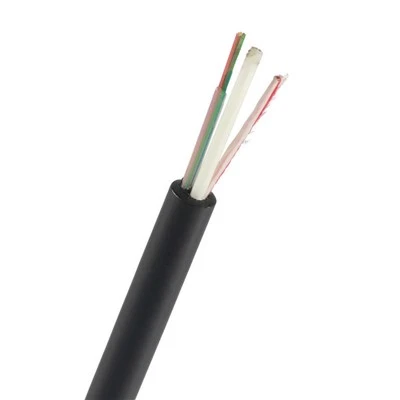
Let’s do a quick recap to make sure I didn’t miss anything. Best practices for labeling FTTH drop cable, no matter if you’re an installer or a buyer: 1) Label at both ends of every drop, within 6 inches of the secured junction point. 2) Use UV-resistant, permanent vinyl labels—skip paper, Sharpie, or flimsy adhesives. 3) Keep labels simple: use 10pt+ all-caps font, split info into lines (network ID, drop number, date, installer code). 4) Add a QR code for extra efficiency if you can. 5) Be consistent with your labeling protocol across your whole team. 6) Never skip labeling short drops, buried drops, or spliced cables.
Indoor Fiber Optic At the end of the day, labeling FTTH drop cable isn’t a boring admin task—it’s a critical part of building a reliable network that your customers will trust. As someone who supplies these cables to installers and telecom companies across the country, I’ve seen firsthand how bad labeling can tank a project, and how good labeling makes the whole process run smoother. If you’re in the market for FTTH drop cables that come pre-labeled to these exact specs, or if you have questions about custom labeling for your network, don’t hesitate to reach out for a procurement chat. We’re here to help make your installs easier and your networks more efficient.
References
- Fiber Broadband Association. (2021). FTTH Installation Best Practices: Drop Cable Labeling and Documentation. FBA Technical Bulletin.
- Telcordia Technologies. (2022). Generic Requirements for Optical Fiber Cable Labeling. GR-326-CORE.
- American National Standards Institute. (2020). Telecommunications Infrastructure Standards for Residential and Commercial Buildings. ANSI/TIA-568-C.2.
- Local Telecommunications Project Case Studies. (2023). Efficiency Gains from Standardized Drop Cable Labeling. Telecom Industry Weekly Report.
Guangdong Shengtang Optical Cable Communication Equipment Co., Ltd.
As one of the most professional ftth drop cable manufacturers and suppliers in China, we’re featured by quality products and good price. Please rest assured to buy bulk durable ftth drop cable in stock here from our factory. Customized orders are welcome.
Address: The 6th floor of Building B3, located on the south side of Jingyi Road, Shiwan Town, Boluo County, Huizhou City, Guangdong Province.
E-mail: gdshengtang@gmail.com
WebSite: https://www.gdstcable.com/
